Restore Old Photos Online with AI
Restore old family photos with AI. Results and processing time depend on the source photo, mode and load.
What We Restore
- Scratches, cracks, and mechanical damage
- Water stains, mold, and chemical damage
- Fading and loss of contrast
- Wear and missing image details
- Folds and creases
- Missing portions of the photograph
First sign-up provides 100 starter credits shared across AI services. Trial results have a watermark; the form shows the mode’s cost.
Restore PhotoHow to Restore a Photo in 3 Steps
Simple restoration process — upload a photo, AI does the rest
Upload the Old Photo
Select an image from your device. JPG, PNG, and other popular formats are supported.
AI Analyzes Damage
AI attempts to remove scratches, stains and fading. The result depends on how much detail remains in the source.
Download the Result
Compare the face, clothing and small details with the original before saving or printing.
Restoration examples
See how our AI restores old photographs


Restoration + colorization
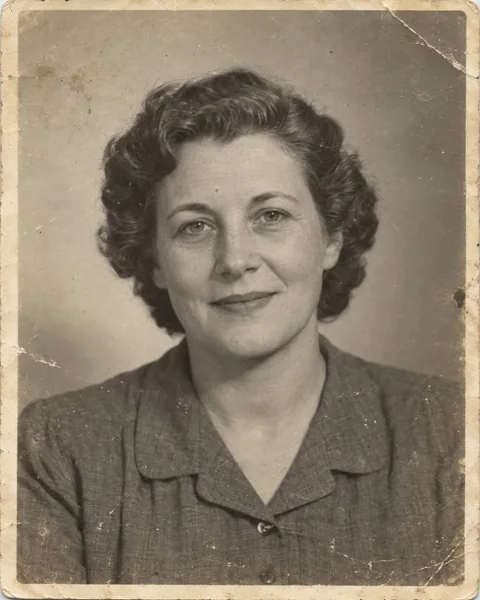
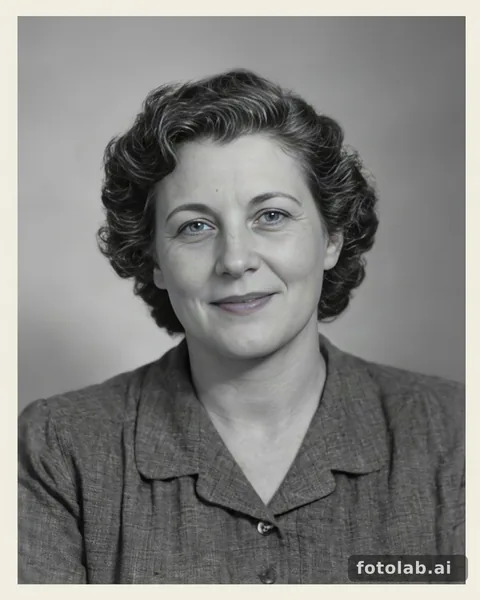
Portrait restoration · synthetic input
50 credits
Synthetic input; actual FotoLab result.


Colorization
Portrait example: settings and limitationsDamaged print: compare the detailsFamily photo: colour and limitationsPrepare an old photo
See the results and how processing works
Frequently Asked Questions About Photo Restoration
Answers to popular questions about restoring old and damaged photographs
How long does photo restoration take?
Allow a few minutes. Time depends on the mode, image size and load; the form shows the current processing status.
What types of damage can be fixed?
Restoration can reduce scratches, cracks, stains, fading, wear and creases. AI reconstructs missing areas from the surviving detail, so they may differ from the original. The result depends on the source photo and the extent of the damage.
How much does photo restoration cost?
Restoration costs 50 credits (about 50 ₽ in the Basic pack). The exact cost is shown in the form before you start. First sign-up provides 100 starter credits shared across AI services. Results have a watermark until your first purchase.
Is color photo restoration supported?
Yes, you can process a color or black-and-white photo. Choose black-and-white restoration for a monochrome result. In color mode, AI estimates shades that may differ from the actual colors of eyes, clothing and surrounding objects.
What quality is the restored photo?
Format and resolution depend on the mode and source photo. AI may alter facial features and small details, especially in badly damaged areas. Compare the result with the original at full size before printing and keep both files.
Can very old photographs be restored?
You can try restoration on an old scan or a carefully photographed print. Source clarity and surviving detail matter more than the photo's age. If facial features are completely missing, AI may reconstruct them differently, so check one result first.
Didn't find the answer to your question?
Ask a QuestionWhat happens to your photo
- Source file retention
- Uploaded source files are automatically deleted from storage about 7 days after upload.
- Your result
- Download your own copy right after processing. How long a result is kept depends on the file type.
- Deletion on request
- Hiding a history entry does not delete the file immediately. To have a photo deleted earlier, contact support at support@fotolab.ai.
- Who has access
- Access to data is restricted. Photos are shared only to operate the service (processing, hosting, payments), and faces in photos are not used to identify anyone.
Details about retention and your rights are in the privacy policy.
Ready to Restore Your Old Memories?
Don't let time erase important moments. Bring clarity back to your family photos right now.
Once the photo is repaired, you can turn it into a short video with natural gaze and expressions.