Skip to content
AI Studio: video and imagesUnlock more ways to create in our AI StudioGo to Studio
FotoLab.ai
AI StudioNEWAnimateRestoreFree tools
PricingContact
FotoLab · AI Restoration

Restore an old photo online

Remove scratches and bring an old photo back into focus. Upload a photo to get started. 100 starter credits after sign-up. Trial results have a watermark.

See restoration examples
Secure processing
50 creditsper restoration

100 starter credits after sign-up. Trial results have a watermark. The cost is shown before you start. Each new run uses credits.

See current credit packs · Free editing on your device, without AI credits

Try restoring an old photo with starter credits

Start with one photo and check the result before working on your collection. No payment card is needed to sign up.

Your first trial
100 starter credits for first sign-up, subject to safeguards against repeat registrations. The balance is shared across animation, restoration and enhancement; the number of runs depends on your chosen settings. The form shows the cost before you start.
Your result
Trial results have a fotolab.ai watermark. After your first credit purchase, results of new processing runs have no watermark.
Further processing
Each new run uses credits, including another attempt with different settings. Top up when the remaining balance is too low. Credit packs have no subscription.
See current credit packs

See the results and how processing works

View examplesPrepare a photo for restoration

Other Features

Photo AnimationPhoto EnhancementRestoring old family photographs

Want to see the person in motion? After restoration, try old photo animation.

What is AI photo restoration

Photo restoration is the automatic recovery of damaged or faded photographs using a neural network. The algorithm removes scratches, cracks, stains, tears, restores lost fragments, and improves sharpness. Processing a single photo takes a few minutes; the result is saved in high resolution.

What damage we can fix

  • Scratches, cracks, creases, and abrasions
  • Fading and yellowing from age
  • Stains, smudges, water and mould marks
  • Tears and missing fragments
  • Noise, blur, low resolution
  • Optional colourisation of black-and-white photographs

How closely does the result match the original

The result depends on the source quality and how much detail survives. AI may reconstruct missing areas, so facial features, skin texture, clothing and small objects can differ from the original. Colorization estimates colors that cannot be verified from a black-and-white photo. Compare both images at full size before printing and keep a separate copy of the source.

How to prepare an old photo for restoration

  1. Upload the original scan or a straight photo without glare. Avoid reducing the image before uploading.
  2. Choose your mode in the form: restore in black and white, restore with colour, or colourise.
  3. Check one result before working on your family collection. Every new run uses credits.

Want to add movement? Download your restored photo and animate the portrait. Restoration and animation are separate processing runs that share your credit balance.

How much does one photo restoration cost

One restoration costs 50 credits. The monetary cost depends on your chosen credit pack. See current prices and pack sizes on the pricing page.

How does photo restoration differ from photo enhancement?

Restoration repairs damage to a photo, while enhancement only increases its resolution and makes details crisper. Restoration removes scratches, stains, creases and fading, restores lost fragments and can colourise a black-and-white frame if you choose to. Enhancement does not heal damage: it enlarges the picture 2 or 4 times and reduces noise, so it suits a clean but small or soft photo, for example before printing. If a picture has both scratches and low resolution, start with restoration and enlarge the result separately if you still need to. AI can reconstruct missing features differently; compare the face and small details with the original. Results depend on source quality. Restoration costs 50 credits per photo. Enhancement costs 50 credits in Standard mode and 100 in Premium mode. The balance is shared, so one credit pack covers both, and the cost is shown in the form before you start.

  • Photo enhancement →
  • Pricing →

Frequently Asked Questions About Photo Restoration

Answers to popular questions about restoring old and damaged photographs

How long does photo restoration take?

Allow a few minutes. Time depends on the mode, image size and load; the form shows the current processing status.

What types of damage can be fixed?

Restoration can reduce scratches, cracks, stains, fading, wear and creases. AI reconstructs missing areas from the surviving detail, so they may differ from the original. The result depends on the source photo and the extent of the damage.

How much does photo restoration cost?

Restoration costs 50 credits (about 50 ₽ in the Basic pack). The exact cost is shown in the form before you start. First sign-up provides 100 starter credits shared across AI services. Results have a watermark until your first purchase.

Is color photo restoration supported?

Yes, you can process a color or black-and-white photo. Choose black-and-white restoration for a monochrome result. In color mode, AI estimates shades that may differ from the actual colors of eyes, clothing and surrounding objects.

What quality is the restored photo?

Format and resolution depend on the mode and source photo. AI may alter facial features and small details, especially in badly damaged areas. Compare the result with the original at full size before printing and keep both files.

Can very old photographs be restored?

You can try restoration on an old scan or a carefully photographed print. Source clarity and surviving detail matter more than the photo's age. If facial features are completely missing, AI may reconstruct them differently, so check one result first.

Didn't find the answer to your question?

Ask a Question

Before restoring your photo

Can I restore a photo for free?

An account is required to start processing. First sign-up provides 100 starter credits to try the service, subject to safeguards against repeat registrations. These credits are shared across services; your selected mode and its cost are shown in the form.

What happens when my starter credits run out?

When your balance is lower than the cost of your selected settings, you need to purchase a credit pack. Every new processing run uses credits. Viewing or downloading an existing result is not another processing run.

How do I get a restored photo without a watermark?

Purchase a credit pack before starting a new restoration to get a result without a watermark. A previously downloaded trial photo keeps its watermark; purchasing credits does not change that file.

What happens to your photo

Source file retention
Uploaded source files are automatically deleted from storage about 7 days after upload.
Your result
Download your own copy right after processing. How long a result is kept depends on the file type.
Deletion on request
Hiding a history entry does not delete the file immediately. To have a photo deleted earlier, contact support at support@fotolab.ai.
Who has access
Access to data is restricted. Photos are shared only to operate the service (processing, hosting, payments), and faces in photos are not used to identify anyone.

Details about retention and your rights are in the privacy policy.

Ready to Restore Your Photos?

Try restoration on one photo and compare it with the original before processing your whole family collection.

Photos transferred over HTTPS

FotoLab.ai

Professional AI photo restoration. We restore your precious memories using cutting-edge machine learning technology.

Sections

How It WorksExamplesReviews and examplesFAQPhoto converterPricing

Animation

Animate old photosPhoto animation onlinePhoto animation guideAll guides and examples

Restoration

Old photo restorationRestore photos onlinePhoto quality enhancement

Legal

AboutPrivacy PolicyTerms of Service

Company Info

IE Zakharov M.S.

INN: 361608356714

support@fotolab.ai

Credits never expire and there is no subscription. See pricing and processing costs

© 2026 FotoLab.ai. All rights reserved.

Restoration examples

See how our AI restores old photographs

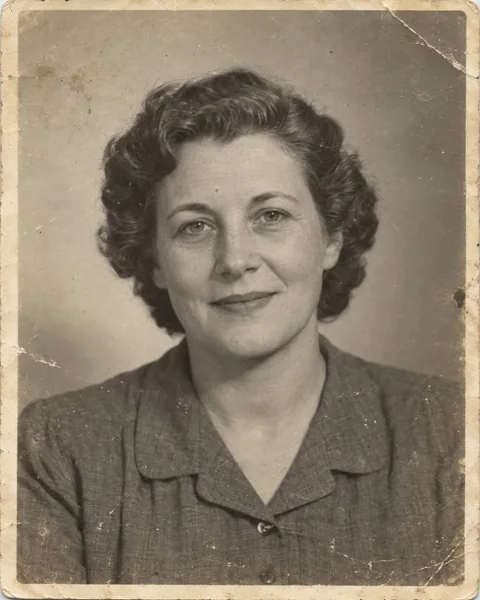
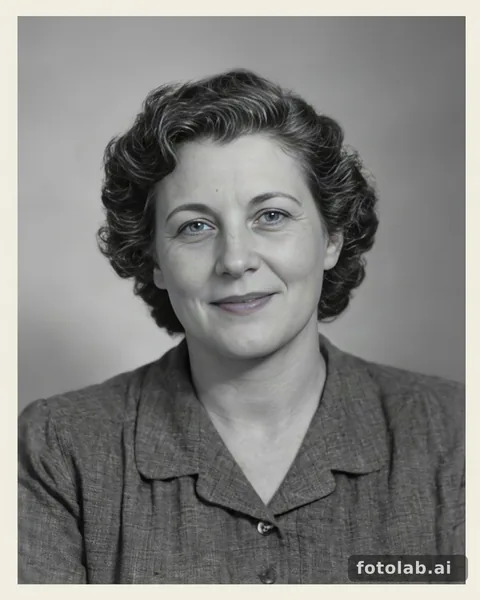
BeforeAfter
Before
After

Restoration + colorization

BeforeAfter
Before
After

Portrait restoration · synthetic input

50 credits

Synthetic input; actual FotoLab result.

BeforeAfter
Before
After

Colorization

Portrait example: settings and limitationsDamaged print: compare the detailsFamily photo: colour and limitationsPrepare an old photo

See the results and how processing works

View examplesPrepare a photo for restoration